SlidesMate vs Gamma: Exports, Pricing and Editing Compared
SlidesMate vs Gamma
SlidesMate and Gamma both generate a presentation from a prompt and then let you edit it. On paper they overlap more than most comparisons admit: both export to PowerPoint and PDF, both use AI credits, and both have paid plans in a similar price range. The real differences are in what you get for free, how much each tool does beyond slides, who can collaborate, and how the exported files behave once they leave the app.
A note on who wrote this: SlidesMate publishes this page, and we make one of the two products. Gamma facts below come from Gamma's own pricing page and help center, checked on November 4, 2026. SlidesMate facts come from our pricing page and product code. This is a comparison of documented features and prices, not a scored benchmark, and where we give an opinion we say so.
How SlidesMate and Gamma compare on plans and features
| SlidesMate | Gamma | |
|---|---|---|
| No-cost access | 7-day trial: up to 5 presentations, 100 AI credits, no card | Free plan with no time limit: 400 starter credits that do not refill |
| Export without paying | Watermarked PDF only | PDF, PPTX, PNG and Google Slides (via PPTX), with a Gamma badge on exported files |
| Entry paid plan | Plus: $8 billed monthly, or $79/year | Plus: $12/seat billed monthly, or $9/seat/month billed annually ($108/year) |
| Mid plan | Pro: $16 billed monthly, or $149/year | Pro: $25/seat billed monthly, or $18/seat/month billed annually ($216/year) |
| Top individual plan | No equivalent | Ultra: $100/seat billed monthly, or $90/seat/month billed annually ($1,080/year) |
| Team plan | Business: $30 billed monthly, or $299/year | Business: $40/seat/month billed annually ($480/year per seat) |
| Monthly AI credits | 200 (Plus), 500 (Pro), 2,000 (Business) | 1,500 (Plus), 4,000 (Pro), 20,000 (Ultra), 10,000 per seat (Business) |
| PowerPoint (PPTX) export | Paid plans (editable or pixel-perfect) | All plans (badge on Free) |
| Real-time collaboration | Business plan only | Workspace members can collaborate on all plans, including Free |
| Formats beyond slides | Presentations only | Presentations, documents, websites, social posts and graphics |
| Import existing files | Web URLs and source documents (PDF, DOCX, TXT, Markdown) as generation input; no PowerPoint import | Imports PDF and PPTX |
| API | Markdown conversion API on Business | API access listed on Pro and Ultra in the plan guide; check current API eligibility |
The individual dollar prices below were checked on November 3, 2026; plan features and help-center guidance were rechecked on November 4. Gamma figures come from Gamma's pricing page (both the monthly and annual billing views, US dollars, before tax), its plan guide and its Business plan article, as of November 2026. Gamma bills per seat, so each workspace member is charged separately. Its Free plan starts with 400 credits that do not refresh, and generates up to 10 slides per prompt (100 on paid plans). Credit counts are not comparable one-for-one: each vendor decides what an action costs.
What Gamma does better
A permanent free plan with real exports. Gamma's Free plan has no time limit and, according to its export guide, exports to PDF, PNG and PowerPoint. A "Made by Gamma" badge appears on PDF and PPTX files exported from a Free workspace, and any paid plan removes it. SlidesMate's trial lasts seven days and only exports a watermarked PDF. If you need a free, editable PowerPoint file, Gamma wins.
Different AI allowances. Gamma's Plus plan includes 1,500 monthly credits. SlidesMate Plus includes 200. Credit costs differ by action, so the larger count does not establish how many equivalent decks you can generate.
Collaboration on lower tiers. Gamma's sharing article lists link sharing and workspace collaboration on every plan, including Free, with view, comment and edit access levels. SlidesMate only includes real-time collaboration on Business.
Breadth. Gamma also builds documents, websites and social graphics, imports PowerPoint files, and offers custom domains and viewer analytics on Pro. SlidesMate is a presentation tool and does not try to be a website builder.
Where SlidesMate is a reasonable choice
Lower entry price for slides only. SlidesMate Plus costs $8 billed monthly, or $79 a year. Gamma Plus costs $12 per seat billed monthly, or $108 a year per seat. If you only make decks and 200 credits a month covers your volume, SlidesMate costs less.
Two PowerPoint modes. Paid SlidesMate plans offer an editable PowerPoint export, where titles, body text, shapes and tables are native PowerPoint objects with speaker notes attached, and a pixel-perfect export that places each slide as an image for an exact visual copy. Choosing between "editable" and "looks identical" is useful when a client only needs to read the file.
Starting from a structured brief. SlidesMate's create flow accepts a prompt, an outline, or an uploaded PDF, Word, text or Markdown file, then opens the draft in an editor with layouts, themes and speaker notes. The same screen also accepts a web link. This is a workflow preference rather than a claim that Gamma lacks source-based generation.
How Gamma's PowerPoint export behaves
Gamma is not browser-only: its pricing page lists PPTX export on the Free plan, and its export guide describes the details as of November 2026:
- Free-workspace PDF and PPTX exports carry a "Made by Gamma" badge. Plus, Pro and Ultra remove it.
- Tables export as editable PowerPoint tables by default, with square corners because PowerPoint does not support rounded table corners.
- Speaker notes are included in PPTX exports.
- Theme fonts, including uploaded custom fonts, are embedded in the PPTX file. Google Slides ignores embedded fonts, so text can look different there.
- Slide masters are not included, so PowerPoint's Slide Master view appears blank.
- Gradient headings and frosted backgrounds may fall back to simpler styles.
- Charts imported from Google Sheets arrive in PowerPoint as static images.
Gamma's slides article also says presentations now use a fixed 16:9 canvas with grid and freeform layouts. The "scrolling cards" description that many comparisons still use is out of date.
How to keep a structured brief intact
Gamma's current slide documentation distinguishes two generation modes. Freeform lets AI decide slide boundaries. Slide-by-slide starts a new slide at each --- separator. For an approved six-part outline, use Slide-by-slide and select at least six slides: Gamma says blocks beyond the selected slide count are omitted. That setting matters more than whether a tool calls its content a card or a slide.
SlidesMate offers a dedicated outline input where you define sections before generation. After generation, its Remix menu distinguishes changing a layout from rewriting content. A layout remix changes layout data without an AI call; a rewrite asks AI to change text. Review both the visible slide and the source facts afterward, because retaining fields in the data does not ensure a different layout renders every field.
For a leadership decision deck, review the approval request, supplied metrics, assumptions and next steps separately. The Orion example below illustrates why this matters: a generated slide can contain the requested numbers while still needing a more useful headline and clearer treatment of missing information. No amount of visual cleanup establishes whether an unsupported business claim is true.
What to know about SlidesMate's PowerPoint export
These details come from SlidesMate's export code, and they matter if someone else will edit the file:
- Editable export is available on Plus, Pro and Business. The trial only offers a watermarked PDF.
- Text, shapes and tables export as native objects, and speaker notes travel with each slide.
- Gradient backgrounds become a solid theme color in the editable file.
- Fonts are referenced by name rather than embedded, so the person opening the file needs the same fonts installed or PowerPoint will substitute them.
- Images from the built-in stock sources (Pexels and Unsplash) are included. Images hosted elsewhere may be left out of the editable file, so check the export before sending it.
- If the file must look exactly like the editor, use the pixel-perfect export. The text in that file cannot be edited.
SlidesMate's output from one live run
To show what a SlidesMate draft actually looks like before review, we ran one live generation on November 3, 2026. We used the "Project Orion" brief from our homepage: a 6-slide decision brief for a leadership team with four supplied facts (68% pilot adoption, support tickets down 21%, $420,000 annualized savings, 3 engineers for 8 weeks). It went through the normal create flow on a local production build of the current SlidesMate code with a test account on the 7-day trial plan, not on slidesmate.com itself. Generation used 10 trial credits. Project Orion and its numbers are fictional. This is SlidesMate's output only; Gamma was not run on the same brief, so it is not a head-to-head result.
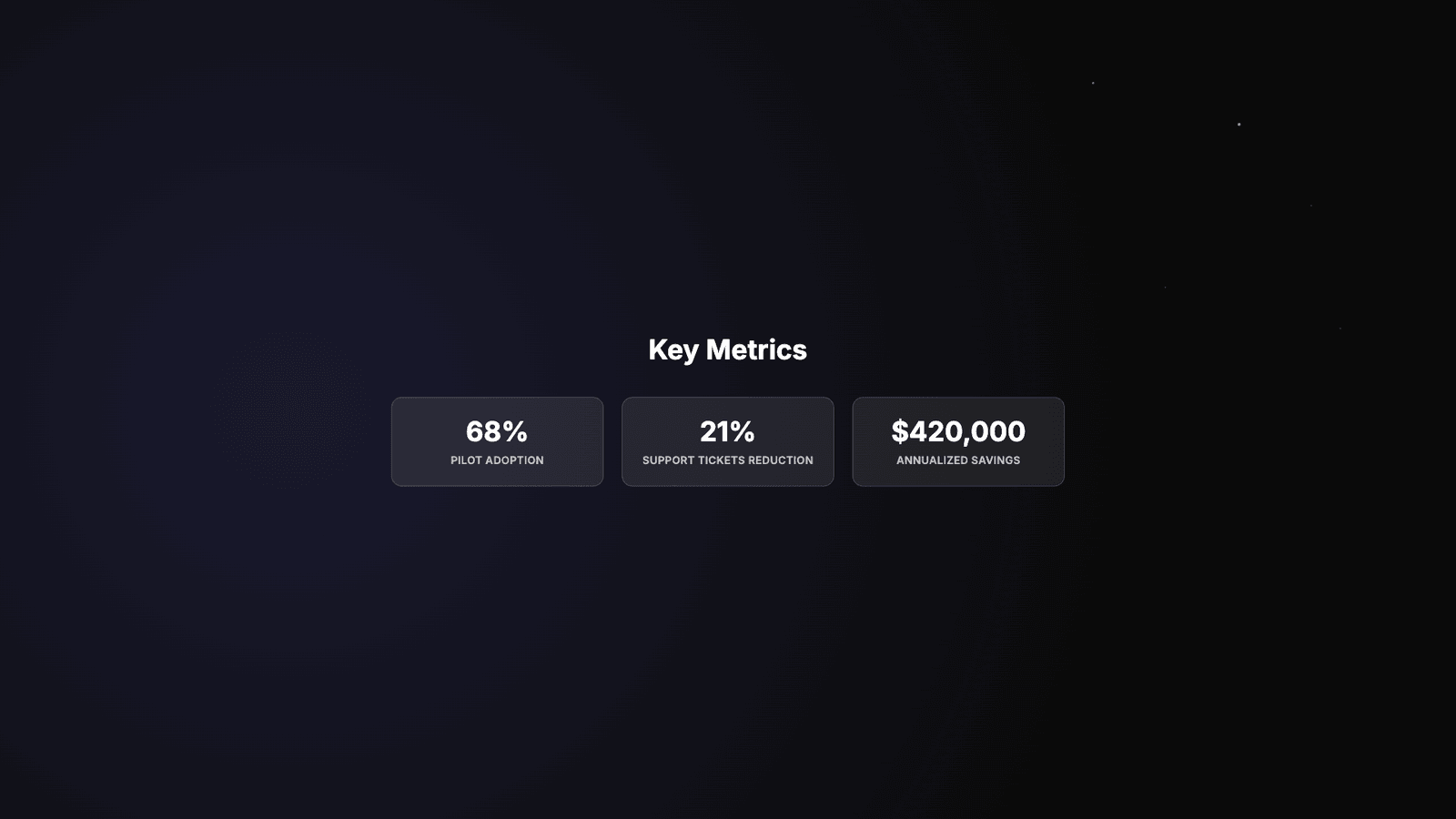

The draft used all four facts and did not invent new figures, but it was not ready to send. A reviewer made six edits: leading the cover with the decision instead of "Executive Summary", putting the four facts on the opening slide, removing repeated "Potential risk to validate:" and "Decision to consider:" prefixes, and stating that the brief gave no rollout dates or owner. Every change is listed with before, after and reason in the edit log.
- Generation log (date, environment, plan, credits)
- Unedited draft as the trial exports it (watermarked PDF)
- Edited deck as editable PowerPoint and as PDF, exported with paid-plan exports
Which one to choose
Our view, which is a judgment from the documented features rather than a test result: Gamma is the stronger pick if you need a free plan, collaboration without paying for a team tier, a free PowerPoint export you can live with a badge on, or web pages and documents alongside decks. SlidesMate makes sense if you only produce slide decks, want a lower monthly price for that, and want a choice between an editable and a pixel-perfect PowerPoint file.
For a handoff, first decide what the recipient must change. If they need to update a table value, use an editable export and confirm that the table is selectable. If they only need to present an approved visual, SlidesMate's image-based PPTX can be appropriate, but it sacrifices text editing. A PDF is also useful as a visual reference beside the editable file.
Open the PPTX in the recipient's intended application and inspect a dense slide, a table and the speaker notes. Gamma documents embedded theme fonts and editable tables; SlidesMate references fonts by name. Neither fact guarantees identical rendering on another machine. Treat export cleanup as a requirement of your handoff, rather than assuming either vendor has eliminated it.
FAQ
Can Gamma export to PowerPoint?
Yes. As of November 2026, Gamma lists PPTX export on all plans. Free-plan exports carry a "Made by Gamma" badge, and any paid plan removes it (Gamma export guide).
Is SlidesMate free?
SlidesMate offers a 7-day free trial with up to 5 presentations and 100 AI credits. No card is required. The trial exports a watermarked PDF. Clean PDF, editable PowerPoint, PNG and HTML exports require a paid plan. See pricing.
Can I move a deck between the two tools?
Gamma imports PPTX files, so you can export an editable PowerPoint from SlidesMate and import it into Gamma. SlidesMate does not import PowerPoint files. You can upload a PDF or Word version of the content as source material for a new draft, but layouts will not carry over.
Which is better for collaboration?
Gamma, unless you are on SlidesMate Business. Gamma includes workspace collaboration and edit or comment links on every plan. SlidesMate includes real-time collaboration only on Business ($30/month or $299/year).
For other matchups, see SlidesMate vs Canva, SlidesMate vs Beautiful.ai and the broader AI presentation tools comparison. To test SlidesMate with your own brief, start a draft.
Related Articles
SlidesMate vs PowerPoint with Copilot: 2026 Comparison
SlidesMate vs PowerPoint, November 2026: base PowerPoint, Copilot deck creation and licensing, what SlidesMate's PPTX export keeps editable, and price.
SlidesMate vs Google Slides with Gemini: 2026 Comparison
SlidesMate vs Google Slides as of November 2026: Gemini deck generation and plan eligibility, free access, collaboration, PPTX export and pricing.
SlidesMate vs Beautiful.ai: AI Decks, Pricing and Exports
SlidesMate vs Beautiful.ai as of November 2026: AI deck generation, Smart Slides, trials, PowerPoint export, collaboration, templates and pricing.
SlidesMate vs Canva for Presentations: 2026 Comparison
SlidesMate vs Canva as of November 2026: Canva AI deck generation, AI limits, PPTX export, collaboration and pricing, with sources and honest trade-offs.