SlidesMate vs Google Slides with Gemini: 2026 Comparison
SlidesMate vs Google Slides
Google Slides is no longer just a manual, slide-by-slide editor. In July 2026, Google announced that Gemini in Slides can generate complete, editable presentations from a prompt and reference files. That changes the comparison. The useful question is no longer "AI or manual". It is which version of Google Slides you actually have access to, and whether a separate tool adds anything to it.
SlidesMate publishes this page and makes one of the products compared. Google details below come from Google's help center, Workspace pricing page and product announcement, checked on November 4, 2026. SlidesMate details come from our pricing page and the product itself. This is a comparison of documented features, plans and file handling, not a timed or scored benchmark, and it does not claim either product is faster.
Two versions of Google Slides
It helps to separate them:
- Google Slides without Gemini deck generation. This is what most people get with a free personal Google account, and it is also what Workspace Business Starter gets in Slides. You get real-time co-editing, comments, version history and PowerPoint import and export. You build the slides yourself.
- Google Slides with Gemini presentation generation. Google's help article says it "requires an eligible Google Workspace or Google AI plan". It is available to personal accounts through the Workspace Experiments tester program, and it currently works on desktop and in English only. Google's announcement names Workspace Business and Enterprise Standard and Plus plans, plus Google AI Pro and AI Ultra subscriptions.
Side-by-side comparison
| SlidesMate | Google Slides (free personal account) | Google Slides with Gemini | |
|---|---|---|---|
| Cost | 7-day trial, then Plus $8/mo or $79/yr, Pro $16/mo or $149/yr, Business $30/mo or $299/yr | Free | Workspace Business Standard at $14 or Plus at $22 per user/month (one-year commitment), or a Google AI Pro or Ultra subscription |
| Full-deck AI generation | Yes, from a prompt, outline or uploaded PDF, DOCX, TXT or Markdown | No | Yes, from a prompt plus Drive files, with an outline you approve first |
| Real-time co-editing | Business plan only | Yes | Yes |
| PowerPoint import | No | Yes: .ppt, .pptx, .pptm, .potx and other formats convert to Slides | Yes |
| PowerPoint export | Paid plans: editable or pixel-perfect PPTX | Yes, saves to .pptx | Yes |
| No-cost export | Watermarked PDF during trial | PPTX and PDF | n/a |
| Matching an existing deck's style | Themes and saved brand colors and fonts (Plus and above) | Manual | "Match presentation style" from an existing deck in Drive |
| Draft language | 10 selectable languages, including Spanish, French, German, Japanese and Arabic | You write in any language | English only for now |
| Where AI generation works | In the browser | n/a | Desktop only for now |
Workspace prices are from workspace.google.com/pricing as of November 4, 2026, with the page's annual-commitment view selected. These are US-dollar list prices before tax, excluding introductory promotions; regional prices and offers can differ. In Google's plan comparison table, "Gemini in Slides" is marked as not included on Business Starter ($7 per user/month) and included on Standard and Plus. Google AI Pro and Ultra prices vary by country, so check the Google One plans page for your region. PowerPoint file types are from Google's Work with Office files help article.
How Gemini builds a presentation
According to Google's help center, you describe the deck in the Gemini side panel and can add files from Drive as references. You can also let Gemini search the web, Drive, Chat or Gmail. Gemini asks follow-up questions, then produces a plan with an overview, sources and a slide-by-slide outline. You edit the plan and approve it, and Gemini builds the slides. Google notes this "may take a few minutes" and that you must keep the tab open.
This is close to SlidesMate's own flow: a brief in /create, an AI draft, then editing in the SlidesMate editor. If you already pay for an eligible Workspace plan and your team works in English, Gemini covers much of what a separate AI deck tool does, and the deck stays in Drive where your colleagues already collaborate.
Where Google Slides is stronger
- Free collaboration. Co-editing and comments are included at no cost. SlidesMate only offers real-time collaboration on Business.
- Free PowerPoint and PDF export. Google Slides downloads both without a watermark. SlidesMate's trial only exports a watermarked PDF.
- Context from your files. Gemini can draw on Docs, Sheets, PDFs and earlier decks in Drive, and on Gmail and Chat if those sources are enabled.
- No new tool to adopt. For a team already on Workspace, there is no new account, billing or permissions model.
Where SlidesMate may help
- No Workspace tier needed for AI drafts. If you use a free Google account or Business Starter, Slides does not generate full decks for you (outside the Experiments program). Compare the cost for the people who actually need drafting, rather than assuming a standalone tool replaces Workspace. Workspace includes email, storage and other services; an existing eligible subscription may mean no additional subscription is needed for Gemini.
- Non-English drafts. Gemini deck generation is English-only for now. SlidesMate's create flow lets you pick from 10 languages, including Spanish, Portuguese, Chinese, Hindi and Korean.
- Editable or pixel-perfect PowerPoint. SlidesMate's editable PPTX exports text, shapes and tables as native objects with speaker notes. You can upload that file to Google Slides to co-edit it. The pixel-perfect PPTX keeps the exact look but places each slide as an image.
A real SlidesMate draft
To show SlidesMate's side, we ran one live generation on November 3, 2026: the Project Orion decision-brief prompt from our homepage, entered in /create with "Generate 6-slide draft" on a trial-plan account. It used 10 AI credits and took 11.2 seconds from click to saved draft. It ran on a local production build of the current SlidesMate code with a test account, not on slidesmate.com. Project Orion and its figures are fictional, and Google Slides was not given the same prompt, so this shows SlidesMate's output only, not a head-to-head result.
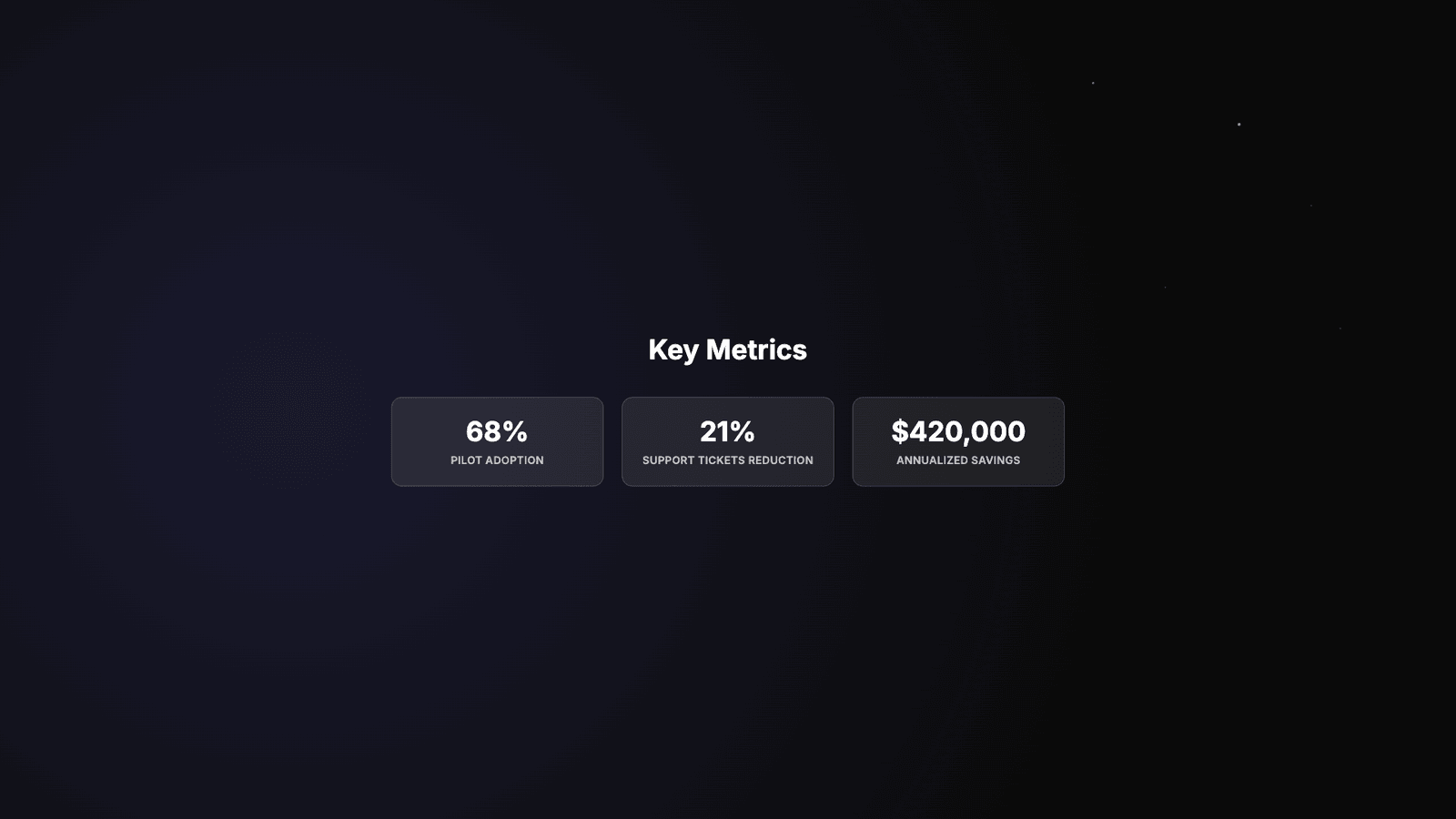
The slide above is exactly as generated. The trial's own watermarked PDF export has all six unedited slides. We then made six edits in the editor, such as replacing the "Executive Summary" title with the decision being requested and removing a repeated "Decision to consider:" prefix, and exported the result with a paid plan's clean exports: editable PowerPoint and PDF. You can upload the PowerPoint file to Drive to see how it converts in Google Slides.
Moving a SlidesMate deck into Google Slides
On a paid SlidesMate plan, export PowerPoint (Editable) for text and object editing. Google's Office-file instructions and PowerPoint switching guide distinguish editing the PPTX directly from converting it into a Google Slides file. Decide which file will be the team's working copy before sharing it.
- Upload the exported PPTX to Google Drive, then double-click it to open in Google Slides. Google supports editing Office files directly, including real-time collaboration.
- To make a native Slides copy, use File → Save as Google Slides. Keep track of the original PPTX and converted copy so reviewers do not comment on different versions.
- Compare the opened file against the SlidesMate PDF or slide renders. Check titles, body text, image crops and line breaks. Gradients export as solid colors, and fonts are referenced rather than embedded. Use a font available in Google Slides if substitution changes the layout.
- Confirm all necessary content survived. SlidesMate rebuilds layouts in editable export; the current Orion PPTX retains the rollout resource requirement and closing approval request as native text, but review your own deck against its PDF rather than assuming every layout will transfer identically. Images from the built-in stock sources or embedded PNG/JPEG data export; other image hosts are excluded.
- Share the chosen Drive file with the appropriate viewer, commenter or editor permissions. When a recipient needs PowerPoint, download a PPTX from Slides and check that downloaded copy too.
Google also documents that embedded PowerPoint charts and videos become images and SmartArt becomes Google Drawings. Those caveats matter for other imported decks; SlidesMate does not generate native chart objects. A Pixel-perfect SlidesMate PPTX contains a slide image on each page, so importing it will not make its text editable.
Edits in Google Slides do not sync back to SlidesMate, and SlidesMate cannot import the revised PPTX. This walkthrough follows Google's documented workflow and SlidesMate's exporter behavior; the Orion file has not been imported into a Google account for this comparison.
Which should you choose?
Our recommendation, based on the documented features above:
- On an eligible Workspace or Google AI plan, working in English? Try Gemini in Slides first. It may be all you need.
- On free Google Slides and need AI drafts occasionally? SlidesMate's trial lets you judge draft quality at no cost. Clean exports need a paid plan.
- Need collaboration? Google Slides, unless you are on SlidesMate Business.
If you have access to both, the quickest way to decide is to give each the same brief and source file, then compare how many facts you had to correct and how the exported PowerPoint opens. For fundraising decks specifically, see how to create a pitch deck with AI or start from the startup pitch deck template.
FAQ
Is Gemini in Google Slides free?
Full-presentation generation requires an eligible Google Workspace or Google AI plan, according to Google's help center. Personal accounts can try it through Workspace Experiments, a trusted tester program. It is currently desktop-only and English-only.
Can I edit a SlidesMate deck in Google Slides?
SlidesMate paid plans provide an editable PowerPoint export that Google Slides supports opening. Review the imported file for missing content, font substitution and image changes; this page does not report a completed Google Slides import test.
Does SlidesMate support real-time collaboration?
Only on the Business plan ($30/month or $299/year). The trial, Plus and Pro plans do not include collaboration.
Is SlidesMate free?
SlidesMate has a 7-day free trial with up to 5 presentations and 100 AI credits, and no card is required. The trial exports a watermarked PDF. See pricing.
Other comparisons: SlidesMate vs PowerPoint, SlidesMate vs Canva and SlidesMate vs Gamma.
Related Articles
SlidesMate vs PowerPoint with Copilot: 2026 Comparison
SlidesMate vs PowerPoint, November 2026: base PowerPoint, Copilot deck creation and licensing, what SlidesMate's PPTX export keeps editable, and price.
SlidesMate vs Beautiful.ai: AI Decks, Pricing and Exports
SlidesMate vs Beautiful.ai as of November 2026: AI deck generation, Smart Slides, trials, PowerPoint export, collaboration, templates and pricing.
SlidesMate vs Gamma: Exports, Pricing and Editing Compared
SlidesMate vs Gamma as of November 2026: free plan vs trial, PPTX and PDF exports, credits, collaboration and pricing, with sources for every vendor claim.
SlidesMate vs Canva for Presentations: 2026 Comparison
SlidesMate vs Canva as of November 2026: Canva AI deck generation, AI limits, PPTX export, collaboration and pricing, with sources and honest trade-offs.