SlidesMate vs Canva for Presentations: 2026 Comparison
SlidesMate vs Canva for presentations
Canva is no longer only a manual design tool for presentations. Its current help center describes a Canva AI workflow where you enter a prompt, adjust an outline, click Generate presentation, and then refine the result in the editor. So the real question is not whether Canva can generate slides, but how the two products differ on AI limits, PowerPoint output, collaboration and price.
SlidesMate publishes this page and makes one of the products compared. Canva details come from Canva's pricing page and help center, checked on November 4, 2026. SlidesMate details come from our pricing page and product code. This page compares documented features and prices; it is not a scored benchmark, and where we give an opinion we label it as one.
SlidesMate and Canva side by side
| SlidesMate | Canva | |
|---|---|---|
| What it is | AI presentation maker | Design platform covering presentations, social, video, documents, print and more |
| No-cost access | 7-day trial: 5 presentations, 100 AI credits, no card | Free plan with no time limit and limited AI usage |
| AI deck generation | Prompt, outline or uploaded document (PDF, DOCX, TXT, Markdown) | Canva AI: prompt, outline review, then generate. Can attach source files to the prompt |
| How AI is metered | 100 credits (trial), 200/500/2,000 per month (Plus/Pro/Business) | Shared monthly AI allowance. Pro gets 10x and Business 20x the Free amount for Premium and Ultra AI |
| Paid pricing | Plus $8/mo or $79/yr. Pro $16/mo or $149/yr. Business $30/mo or $299/yr | Pro US$18/month or US$144/year for one person. Business US$25/month or US$250/year per person |
| PowerPoint export | Paid plans: editable or pixel-perfect PPTX | PPTX download for presentation designs |
| Free or trial export | Watermarked PDF only | Standard downloads, with quality controls, compression and transparent backgrounds limited to paid and eligible plans |
| Collaboration | Business plan only | Share links with edit, comment or view access. Pro is for one person; teams need Business |
| Templates and assets | Presentation templates and automatic stock image matching | 1.6M+ templates on Free and 3.6M+ on paid plans, plus large stock libraries |
| Import existing files | Source documents (PDF, DOCX, TXT, Markdown) as generation input; no PowerPoint import | Imports PowerPoint files (.ppt, .pptx, .potx), with some content such as 3D objects and WordArt not carried over |
Canva annual pricing, AI allowance and template counts are from canva.com/pricing checked November 4, 2026, in US dollars before tax. Monthly US prices were checked November 3; annual prices were rechecked November 4. The page can redirect to a regional version even with a US country parameter. Canva shows local-currency prices in other countries, so your amount may differ. Canva's import limits come from its upload formats help page. Canva's AI allowance is described in multiples of Free, not SlidesMate credits. Its pricing footnote says advanced tools and complex tasks use more allowance; optional AI add-ons cost extra. Neither the multiplier nor a credit balance is a guaranteed number of usable decks.
How Canva generates a presentation
Canva's help article on creating and refining presentations describes three starting points: a template, existing content, or Canva AI. With Canva AI, you enter a prompt, adjust the outline, generate the slides, and keep editing with Page tools that change the layout and design of a whole slide at once. Canva's AI presentation instructions distinguish the homepage workflow, which offers outlines, from the editor's Templates tab, where fewer options may appear. If you want to approve the story before generating, start from Canva AI on the homepage.
The AI presentation instructions describe Canva AI for Presentations as a premium AI tool that counts toward your monthly AI usage, and says access depends on your plan. Free accounts have "limited access" to Standard and Premium AI, according to the pricing page, and the pricing FAQ says the AI allowance during a Pro trial is the same as Canva Free. If you plan to generate decks often, budget for Pro or Business.
Where Canva is stronger
- Breadth. One account covers decks, social graphics, video, documents, print and whiteboards. SlidesMate only makes presentations.
- Assets and templates. Canva's template and stock libraries are far larger than SlidesMate's.
- Sharing for edit and comment. Canva's sharing help lets you share a design with Can edit, Can comment or Can view access, including with people outside your plan. Guests can edit through an edit-enabled link without signing in, but need to log in to comment. Guests cannot upload files or download the design. Pro accounts cannot invite people into a team; that takes Business. SlidesMate does not offer real-time collaboration below Business.
- A real free plan. Canva Free does not expire. SlidesMate's trial lasts seven days.
- Design control. Canva's editor gives you element-level freedom that a layout-driven slide tool does not.
Where SlidesMate may fit better
- Presentation-only pricing. If you only need slides, SlidesMate Plus costs $8 a month or $79 a year, compared with US$18 a month or US$144 a year for Canva Pro. Whether that saving matters depends on whether you would use the rest of Canva.
- A choice of PowerPoint output. SlidesMate's editable PPTX turns titles, text, shapes and tables into native PowerPoint objects with speaker notes. Its pixel-perfect PPTX places each slide as an image for an exact visual copy. Canva's download help warns that PPTX files "may look different" in PowerPoint, that you may need to install the fonts, and that animations and embedded videos are not supported in the PowerPoint file.
- A narrower editor. SlidesMate's editor is built around slide layouts, themes and speaker notes. Some people find that faster than a general design canvas. That is a preference, not a measured result.
PowerPoint export limits in both tools
If the final deliverable is a PowerPoint file someone else will edit, test the export before you commit.
- Canva: PPTX is available for presentation designs only. Fonts may need to be installed locally, and animations and embedded video may not play (Canva download file types).
- SlidesMate: Editable PPTX requires a paid plan. Gradient backgrounds become solid colors. Fonts are referenced by name, not embedded. Images hosted outside the built-in stock sources may be left out. The pixel-perfect option keeps the look but makes slide text non-editable.
SlidesMate's output from one live run
To show what a SlidesMate draft actually looks like before review, we ran one live generation on November 3, 2026. We used the "Project Orion" brief from our homepage: a 6-slide decision brief for a leadership team with four supplied facts (68% pilot adoption, support tickets down 21%, $420,000 annualized savings, 3 engineers for 8 weeks). It went through the normal create flow on a local production build of the current SlidesMate code with a test account on the 7-day trial plan, not on slidesmate.com itself. Generation used 10 trial credits. Project Orion and its numbers are fictional. This is SlidesMate's output only; Canva was not run on the same brief, so it is not a head-to-head result.
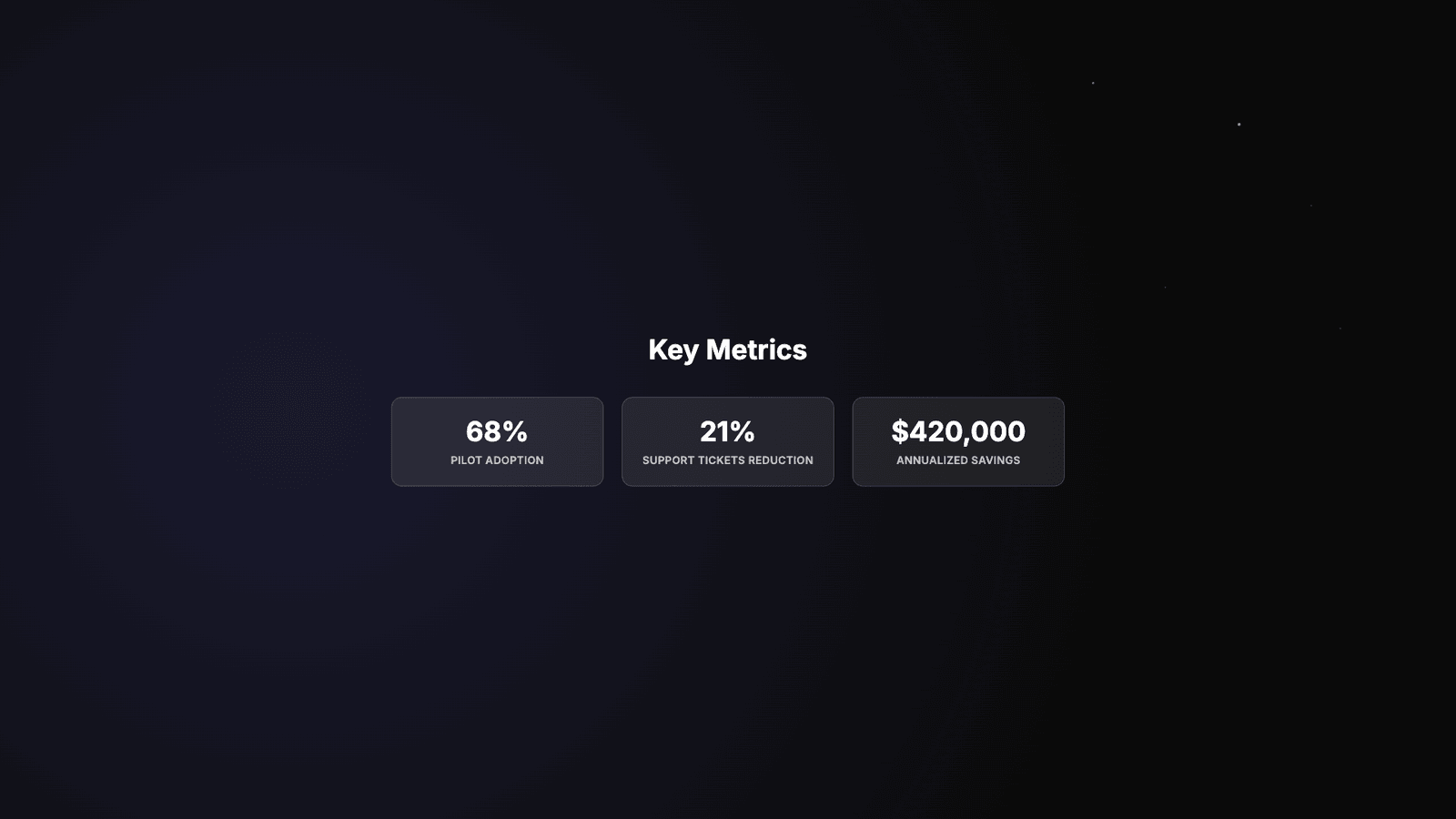

The draft used all four facts and did not invent new figures, but it was not ready to send. A reviewer made six edits: leading the cover with the decision instead of "Executive Summary", putting the four facts on the opening slide, removing repeated "Potential risk to validate:" and "Decision to consider:" prefixes, and stating that the brief gave no rollout dates or owner. Every change is listed with before, after and reason in the edit log.
- Generation log (date, environment, plan, credits)
- Unedited draft as the trial exports it (watermarked PDF)
- Edited deck as editable PowerPoint and as PDF, exported with paid-plan exports
Which workflow should decide your choice?
Start with the constraint that would make a tool unusable for your next deck. Our editorial recommendation is to resolve these questions in order, rather than count features.
- Are you updating an existing PowerPoint? Canva can import PPTX; SlidesMate's source-document generation does not preserve an existing PowerPoint deck. Choose Canva for this starting point, while checking imported objects against the original. Neither an import feature nor a PPTX download promises a lossless round trip.
- Who must review it before delivery? For occasional outside edits, Canva's link permissions may be enough without creating a managed team. Comments require login, and guest editors cannot download or upload files. SlidesMate's in-app collaboration and comments require Business. If you need those controls, comparing Canva Pro against SlidesMate Plus is the wrong purchase comparison.
- What must the recipient change? For editable text, shapes and tables, try SlidesMate's editable PPTX. For a fixed visual handoff, its image-based PPTX preserves appearance but prevents text editing. If the deck depends on Canva animations or video, present from Canva or choose an appropriate video download rather than assume the effects will survive PPTX export.
- What do you already pay for? If Canva already covers your graphics and deck work, keeping it avoids another subscription. For a new individual subscription used only for slides, SlidesMate Plus is the lower-priced paid option listed here. That price advantage disappears as a reason to switch if Canva Free already meets your needs.
For example, a consultant starting from a written client brief and handing over editable slides has a reason to try SlidesMate Plus. A marketing team updating an existing Canva campaign across decks, social graphics and video has a reason to stay in Canva. These are workflow judgments, not measured speed or output-quality results.
Check the handoff before choosing an annual plan
Use a representative slide containing your longest heading, a table, a brand font and an image. After export, open it in the recipient's PowerPoint environment, change a table value and a paragraph, and check wrapping, cropping and speaker notes. If those edits fail, a visually attractive preview has not met the handoff requirement. Use a static export only when the recipient accepts that limitation. This is a suggested acceptance check, not a claim that we ran it in Canva.
SlidesMate is a poor fit if you need PowerPoint import, ongoing free use, or in-app collaboration on its entry paid plan. Canva is the stronger choice for those first two needs and offers link-based guest editing for the third. SlidesMate is worth evaluating when a focused slide workflow and its explicit choice of PowerPoint export modes solve the actual delivery problem.
FAQ
Can Canva create a whole presentation from a prompt?
Yes. Canva's help center describes entering a prompt, adjusting the outline and selecting Generate presentation. Access and usage depend on your plan, and the feature counts toward your monthly AI allowance.
Can I export Canva presentations to PowerPoint?
Yes, presentation designs can be downloaded as PPTX. Canva notes that the file may look different in PowerPoint, and that animations and embedded videos are not supported there.
Does SlidesMate have a free plan?
No. SlidesMate has a 7-day free trial with up to 5 presentations and 100 AI credits, and no card is required. Trial exports are watermarked PDFs. Clean and editable exports start with the Plus plan. See pricing.
Is Canva free for nonprofits or schools?
Canva's pricing FAQ says eligible nonprofits can get a free subscription with Canva Pro's premium features plus team tools, for one team of up to 50 users. Canva Education is available to eligible K-12 educators, their students and qualifying schools and districts. Check Canva's eligibility pages before relying on either offer.
For more comparisons, see SlidesMate vs Gamma, SlidesMate vs Google Slides and the AI presentation tools comparison. To try SlidesMate with your own content, start a draft.
Related Articles
SlidesMate vs PowerPoint with Copilot: 2026 Comparison
SlidesMate vs PowerPoint, November 2026: base PowerPoint, Copilot deck creation and licensing, what SlidesMate's PPTX export keeps editable, and price.
SlidesMate vs Google Slides with Gemini: 2026 Comparison
SlidesMate vs Google Slides as of November 2026: Gemini deck generation and plan eligibility, free access, collaboration, PPTX export and pricing.
SlidesMate vs Beautiful.ai: AI Decks, Pricing and Exports
SlidesMate vs Beautiful.ai as of November 2026: AI deck generation, Smart Slides, trials, PowerPoint export, collaboration, templates and pricing.
SlidesMate vs Gamma: Exports, Pricing and Editing Compared
SlidesMate vs Gamma as of November 2026: free plan vs trial, PPTX and PDF exports, credits, collaboration and pricing, with sources for every vendor claim.